

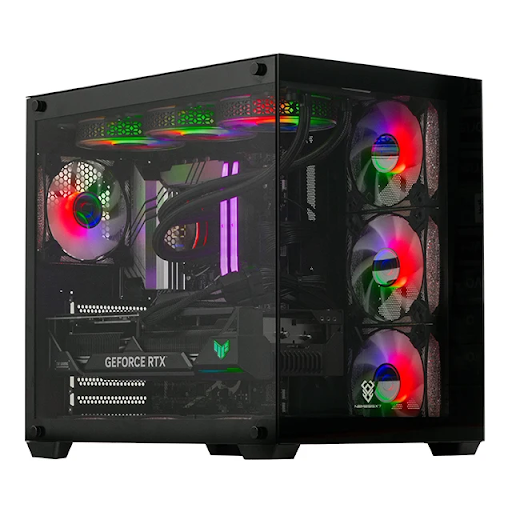
A white gaming PC offers a refreshing alternative to traditional black gaming setups. With a clean finish, modern design and customisable RGB lighting, it can become an attractive part of any gaming space. However, appearance should not come at the cost of performance, cooling or future upgrade options.
Choosing the right system means looking beyond its colour. You need to consider the graphics card, processor, memory, storage and cooling to ensure the PC can handle your favourite games.
Whether you are upgrading your current setup or buying your first gaming computer, this guide explains what to consider before purchasing a white gaming PC. It also explores prebuilt systems, gaming PC bundles and practical buying tips for UK gamers.
Why a White Gaming PC Appeals to So Many Players
White gaming PCs have become popular among gamers who prefer a clean and modern setup. A white case can complement light-coloured desks, gaming furniture and minimalist interiors. It also provides an excellent background for RGB lighting.
Unlike darker cases, white surfaces reflect more light. This can make RGB fans, illuminated memory and internal lighting stand out more clearly. Gamers can experiment with different colours to create a setup that matches their personal style.
However, there is one practical consideration. Dust, fingerprints and cable clutter can be more noticeable on white surfaces. Regular cleaning and good cable management will help maintain the appearance of your system.
Design Details That Matter Beyond the Colour
The colour of your gaming PC is important, but the case design also affects its appearance and everyday use.
Case Finish and Side Panels
Many white gaming PCs feature tempered-glass side panels that allow you to see the internal components. This is particularly useful if you want to showcase RGB lighting and a coordinated interior.
Front panel design also matters. Mesh panels generally support better airflow, while solid panels may offer a more minimal appearance. Look for a design that balances appearance with ventilation.
Matching the Internal Components
A white exterior with mismatched internal components can make a system look less coordinated. Fans, memory modules, cooler covers and cable sleeves may all be visible through the glass.
If appearance is a priority, check the actual product images before purchasing. This helps you understand how the complete build will look rather than judging the case alone.
Lighting Choices
RGB lighting can completely change the appearance of a white gaming PC.
Cool white and blue lighting can create a clean, modern look. Meanwhile, multicolour lighting offers a more vibrant gaming atmosphere.
Choose a system with adjustable lighting so you can change the colours or switch them off whenever required.
Performance: What Actually Drives Gaming Performance?
A white gaming PC performs according to its hardware, not its colour. Therefore, compare the specifications carefully before making a purchase.
Here are the main components to consider.
- Graphics Card (GPU): The graphics card plays a major role in gaming performance, visual quality and frame rates. Choose a suitable model based on the games you play and your monitor’s resolution. You can explore RTX gaming PCs to compare different graphics card configurations.
- Processor (CPU): The processor handles important game calculations and supports overall system performance. A suitable CPU helps prevent performance limitations when paired with a powerful graphics card.
- Memory (RAM): 16GB is a common starting point for modern gaming. However, demanding games, streaming and multitasking may benefit from additional memory.
- Storage: SSD storage helps reduce loading times and improves everyday responsiveness. Check the available capacity to ensure there is enough room for your games and applications.
Match the Gaming PC to Your Monitor
Your monitor resolution should influence your gaming PC purchase.
A system designed for 1080p gaming does not require the same graphics power as one intended for 1440p gaming. If you plan to play demanding games at higher resolutions, consider a more capable graphics card.
Think about your preferred games, refresh rate and visual settings before deciding how much to spend.
Cooling and Airflow in a White Gaming PC
A gaming PC needs effective cooling to maintain stable performance during demanding gaming sessions.
Case airflow depends on fan placement, ventilation and dust filters rather than colour. Look for a system with a suitable airflow design that allows cool air to enter and warm air to escape.
The CPU cooling solution is another important consideration. Standard air coolers can work well for many gaming systems, while liquid cooling may be suitable for certain higher-performance configurations.
If you want to understand the available options, explore guides to CPU coolers and water-cooled PCs before choosing a system.
Did you know? Dust can be easier to notice on white cases. Regularly cleaning the filters helps maintain airflow and keeps the system looking neat.
Prebuilt White Gaming PC or Build Your Own?
Both options have advantages, and the right choice depends on your experience, budget and requirements.
Building your own gaming PC provides complete control over the components and overall design. However, creating a coordinated white setup can take additional time because you need to find compatible components in matching colours.
A prebuilt white gaming PC offers a simpler alternative. The system arrives assembled and tested, reducing the effort involved in selecting and installing individual components.
Before purchasing, check the specifications, warranty coverage, upgrade options and available customer support.
Retailers such as Veno Scorp offer prebuilt gaming PC options for buyers who want to compare different specifications without assembling a system themselves.
Consider these questions before making your decision:
- Does the system have enough performance for your favourite games?
- Can you upgrade the memory, storage or graphics card later?
- Does the case provide suitable airflow?
- Are the warranty and support details clearly explained?
White Gaming PC Bundle: Is It Worth It?
A white gaming PC bundle can be a convenient option if you are starting a gaming setup from scratch.
A typical bundle may include:
- A complete gaming PC.
- A compatible monitor.
- A gaming keyboard.
- A gaming mouse.
The main advantage is convenience. Instead of searching for separate accessories, you can compare a complete setup in one place.
However, bundle contents vary between products. Check the specifications of the included monitor and peripherals to make sure they suit your gaming requirements.
If you already own some accessories, purchasing a standalone gaming PC may be more suitable. You can then select your own monitor, keyboard and mouse.
You can also explore gaming PC bundles to compare available configurations and find a setup that matches your budget.
Do Not Forget the Gaming Desk
Your gaming desk contributes to the overall appearance of your setup.
A white gaming tower can look particularly attractive alongside a clean desk, coordinated accessories and organised cables.
Choose furniture that provides enough room for your monitor, keyboard, mouse and other gaming accessories.
Choosing a UK Gaming PC: Practical Checks
Buying a gaming PC involves more than comparing hardware specifications. UK buyers should also consider delivery, payment options, warranty coverage and customer support.
Here are some useful checks before placing an order.
- Delivery: Review the available delivery services and estimated dispatch times. If you need your system quickly, explore next-day gaming PC options.
- Budget: Set a realistic spending limit and compare systems within that range. Budget gaming PCs can be a useful starting point.
- Payment Options: Check whether finance options are available if you prefer to spread the cost. Always review the applicable terms.
- Warranty: Understand what the warranty covers and how to request assistance if your system develops a problem.
- Customer Support: Check how you can contact the retailer for help before and after your purchase.
- Returns: Read the retailer’s returns policy and understand your rights under the Consumer Rights Act 2015.
These checks can help you make a more informed decision and avoid unexpected issues after purchasing.
A Quick Pre-Purchase Checklist
Before choosing your white gaming PC, review the following points:
- Is the graphics card suitable for your monitor resolution?
- Does the processor meet your gaming requirements?
- Is there enough RAM for your games and applications?
- Does the SSD offer sufficient storage capacity?
- Does the case provide suitable airflow?
- Do the internal components match your preferred design?
- Are warranty, delivery and returns information clearly explained?
Comparing these details will help you choose a system that balances appearance, performance and value.
Getting the Balance Right Between Looks and Hardware
The best white gaming PC combines attractive design with reliable gaming performance. While the appearance of the case and RGB lighting can make a setup stand out, the internal hardware should always be your priority.
Start by identifying the games you want to play and the performance you expect. Then compare graphics cards, processors, memory and storage options. Once you have found a suitable specification, consider the case finish, lighting and additional features.
If you are looking for a complete system without the effort of building one yourself, Veno Scorp offers gaming PC options worth exploring. Compare the available white gaming PCs and gaming PC bundles to find a setup that suits your gaming needs and budget.
Frequently Asked Questions
1. Do white gaming PCs perform differently from black ones?
No. The colour of a gaming PC does not affect its performance. Gaming speed depends on the processor, graphics card, memory, storage and cooling system.
2. Is a prebuilt white gaming PC better than building one myself?
It depends on your requirements. A prebuilt system saves time and arrives assembled and tested. Building your own offers more control over component selection, but sourcing matching white components can take additional effort.
3. Do white gaming PCs get dirty more easily?
Dust and fingerprints are generally more visible on white surfaces, but they do not necessarily collect faster. Regular cleaning and filter maintenance help keep the case looking good.
4. What does a white gaming PC bundle usually include?
A typical bundle may include a gaming PC, monitor, keyboard and mouse. However, the included products vary, so always check the individual product listing before purchasing.
5. What should I check when buying a UK gaming PC?
Compare the hardware specifications, warranty coverage, delivery estimates, returns policy and customer support. Also, make sure the system is suitable for your preferred games and monitor resolution.
6. Are white gaming PCs suitable for high-performance gaming?
Yes. White gaming PCs can support high-performance gaming when equipped with suitable processors, graphics cards, memory and cooling solutions. Choose the specifications according to your gaming requirements rather than the case colour.